Background
When children live far away, phone calls cannot really fill the gap: video calls have to be scheduled, voice assistants speak in a stranger's voice, and most learning content is designed around habits younger people take for granted. The client wanted an app that feels like family is nearby — using a real relative's face and voice, wrapping companionship and age-friendly learning content into something an older person can open unaided. The difficulty sits on two sides: the cloned face and voice have to be convincing and the training process has to be observable, while the elderly-facing screens must stay minimal without skipping a single consent step for portrait and voice data.
What we built
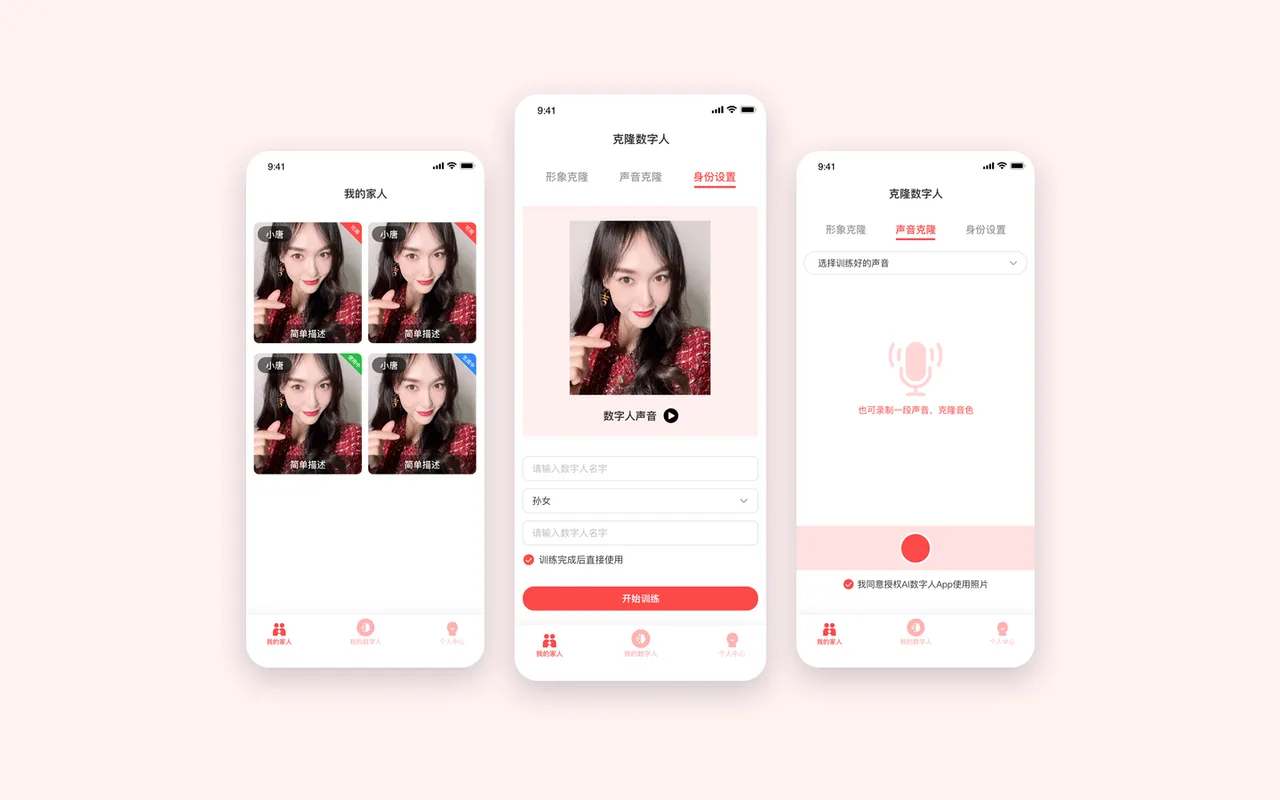
- Cloning in three steps: face cloning, voice cloning and identity setup form one flow. Upload or record footage for the face, record a sample to clone the voice, or reuse an already trained voice; then set the avatar's name and family relationship (grandson, granddaughter and so on), tick "use immediately after training" and submit.
- Visible training state: the family list shows each avatar as a card with its state — generating, available, in use — so the elderly user only ever sees the finished one.
- Several family members: one account can create multiple avatars, distinguished by relationship, and switch which one is currently keeping company.
- Age-friendly interaction: three fixed tabs at the bottom (My Family, My Avatar, Profile), enlarged type and controls, primary actions in a single column, fewer levels and fewer mis-taps.
- Consent and compliance up front: explicit authorization checkboxes before photos and recordings are used, with legal terms, privacy policy, personal-information collection list and third-party sharing list inside the profile tab; the service package and its expiry date are visible to the user.
- Login and account: phone number with a one-time code, nothing to memorize; package status, validity and help all live in one place.
Technical approach
| Layer | Approach |
|---|---|
| Face cloning | Footage capture plus avatar training, with progress state pushed back to the list |
| Voice cloning | Voice sample capture and timbre cloning, with reuse of previously trained voices |
| Client | iOS and Android, three-tab navigation and enlarged type for older users |
| Compliance | Portrait and voice consent, personal-information and third-party sharing lists, package validity on screen |
Results
| Item | Detail |
|---|---|
| Delivery | A mobile app for older users, with family members creating and managing the avatars |
| Core journey | Clone (face / voice / identity) → training → family list → companionship and courses |
| Avatars | Multiple family avatars per account, distinguished by relationship and switchable |
| Users and retention | Not disclosed |
Authorization
The approach and screen structure are shown in redacted form with the client's agreement; the client's name, real user data and operating metrics are withheld under a confidentiality agreement.